Monday, 16 April 2018

DESIGNING CAKE AND CUPCAKE TOPPERS WITH SILHOUETTE CAMEO 3!!


Make your on DIY CAKE and CUPCAKES toppers with this easy and multi-function DIY Machine Plotters! Perfect for parties, wedding, baby showers, gifts and more!
Special for own use and businesses. Is a great tools for #bakers
whatsapp us to get special promo at 


No automatic alt text available.

Wednesday, 21 March 2018

Silhouette Cameo 3 Cutting Plotter Promotion

Looking for small DIY Cutting machine? 
We are offered you special DIY cutting machine that can makes lots things:
=========================================

✔️Design your own custom apparel
✔️Personalize a party
✔️Give your home decor a signature look
✔️Build 3D prototypes
✔️Cut fabric and save time doing it
✔️Decorate with vinyl decals
✔️Construct a school project
✔️Create custom invitations
✔️Make a stencil
✔️Create unique stamps


.........................................................................................................................................

Get Silhouette Cameo Now. 
SPECIAL PROMO + FREE GIFT + FREE DELIVERY.
For more info whatsapp us at: 
click the link up will be direct to your whatsapp

or email us at sales@silhouettecentre.com

LIKE Fb: Silhouette Centre
#silhouettecameo
#TERM&CONDITIONAPPLY

Wednesday, 21 February 2018

Silhouette Cameo 3 RM1199


✔ Cuts a variety of material including vinyl, paper, cardstock, fabric, and other materials up to 12 inches wide and 10 feet long.
✔ Use the powerful Silhouette Studio design software to create your projects.
✔ Features Bluetooth® technology for wireless cutting or plugs into your home computer.
✔ Features a dual-carriage for multi-tool use and a higher 2 mm clearance to cut thicker materials.
✔ Is compatible with Print & Cut and PixScan technology.
✔ Is the only Silhouette compatible with the self-adjusting AutoBlade.
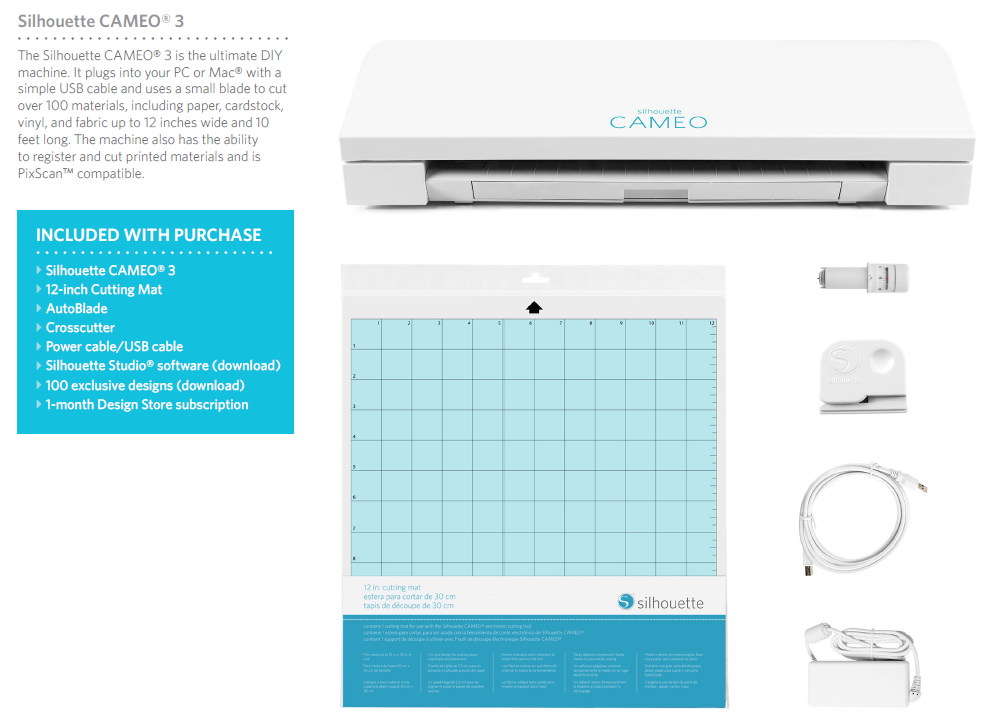
✔ Includes Silhouette CAMEO cutting machine, Silhouette Studio software, power cable and USB cable, 12-Inch Cutting Mat, AutoBlade cutting blade
✔ Brand : Silhouette

click below for price 


Tuesday, 20 February 2018

Silhouette CAMEO 3 Ready Stock | Ultimate DIY Machine for You‎

Interested to know more about Silhouette Cameo 3 Cutting Plotter?
Kindly email or contact our sales person:

012-725 2134 (Ms. Anne)

Email: sales@silhouettecentre.com


PRICE: RM1199 * lowest than market price.
*exclude tax 6% and delivery
*special online order via whatsapp number above.


Wednesday, 14 June 2017

Troubleshooting CAMEO 3: Firmware Problems

Have you ever heard the old adage, “When all else fails, read the directions.” If you follow the CAMEO 3 setup instructions I can almost guarantee smooth sailing ahead.

Silhouette America’s robust troubleshooting FAQ section on their website, which is available for reference any time, day or night!

Firmware

First off, make sure that your Silhouette CAMEO® 3 has the latest firmware installed.

DON’T ASSUME THAT SINCE IT’S A NEW MACHINE IT AUTOMATICALLY HAS THE LATEST FIRMWARE.

I can’t stress this enough. Update the Firmware before going any further in the setup process. To do this, go to https://www.silhouetteamerica.com/firmware, and download the file for the CAMEO 3 that is compatible with your operating system. See below for a picture of the Firmware Update page.


Just by updating your Firmware, you’ll be mitigating 99% of any possible problems.

CAMEO 3 Firmware Bricked

If you tried to update your firmware and the process was interrupted (your computer restarted, froze, etc.) you may have experienced a bad firmware update. If you’re in that boat, never fear, it’s fixable! Check out the steps listed on the Silhouette America FAQ regarding CAMEO 3 Firmware Bricked. Once your Firmware is updated, ensure your software is also up-to-date to prevent any further issues.

Instructions:

If Use PC

  1. Save the ZIP file to your computer
  2. Unzip the file
  3. Open the unzipped folder and RUN the "Silhouette Firmware Update" program
  4. Follow the on-screen instructions


If Use Mac

  1. Save the DMG file to your computer
  2. Run the DMG file to launch the "Silhouette Firmware Update" program
  3. Follow the on-screen instructions


How to Update Software

Inquiry Silhouette Cameo
Whatsapp: +60127252134
Email: sales@silhouettecentre.com

Friday, 9 June 2017

Silhouette CAMEO 3

The Silhouette CAMEO 3

Dream it up. Cut it out.

The Silhouette CAMEO is the ultimate DIY machine. It uses a small blade to cut over 100 materials, including paper, cardstock, vinyl, and fabric up to 12 inch wide. The CAMEO has the ability to register and cut printed materials and is PixScan compatible. What does this mean for you? It is our machine that has one of the largest cutting space and is one of the most versatile in the materials it can cut. Create using your computer, smart phone or tablet.

Silhouette Cameo 3 - +60127252134

Dual-carriage for multi-tool use
Higher 2 mm clearance to cut thicker materials
Included Bluetooth for wireless cutting
Matless cutting capability - Cut vinyl and heat transfer without a cutting mat
Barcode scanning feature for repeated cut jobs - COMING SOON
Compatible with Print and Cut and PixScan technology.
Blade and Silhouette tools storage compartments
Access to the Silhouette Design Store, a marketplace of over 100,000 ready-made designs

Whats In The Box?
Silhouette cameo 3 +60127252134


Silhouette AutoBlade Compatible
Sit back and relax, Silhouette CAMEO 3 has a built in AutoBlade. You will never forget to adjust your blade, the Silhouette will do it for you. In addition to having an AutoBlade, the CAMEO 3 works with the Deep-Cut Blade.


Dual-Carriage
The CAMEO 3 features a dual-carriage. The tool holders are marked with red circle on the left and a blue circle on the right. Insert your tools (such as an AutoBlade and a sketch pen) into the corresponding tool holders as you have assigned in your Cut Settings in Silhouette Studio and watch your machine perform two different functions in one cut job.


Additional Storage
Blade and other storage compartments keep all your extra blades and Silhouette tools in one easy to access storage compartment.


Matless Cutting Capability
The CAMEO 3 is the leading digital cutter for matless cutting. When using paperbacked material such as vinyl or heat transfer the Silhouette CAMEO can cut these materials without using a mat. This allows the CAMEO to cut materials up to 10 feet in length. Do more with your CAMEO than any other cutter on the market!


Silhouette Design Store
The Silhouette Design Store is a marketplace of ready-made shapes for use with your Silhouette. There you will find over 100,000 downloadable designs from dozens of talented artists. Once you’ve purchased a design it is yours to keep and use as much as you want. Build your own personal digital design library to use whenever you want. With the Silhouette Design Store you only pay for the designs you really want—no need for expensive cartridges or access to shapes you’ll never use.


Silhouette Studio software is the most robust and powerful design software for any cutting system on the market. This innovative software is highlighted with features normally found in high-end illustrating software, yet is amazingly simple, easy to use, and absolutely free to Silhouette users. Silhouette Studio gives you countless ways to customize your project.

Have Corel Draw or Adobe Illustrator? For the lost price we have you covered with a Plug-in that allows you to design and cut directly from these programs using Silhouette Connect.


PixScan technology is a new feature in the Silhouette cutting system that allows makers to cut precisely around a printed design or to position cut lines in a specific location on your material using a scanner or camera. You can even use your smartphone or tablet. The PixScan algorithm allows the Silhouette CAMEO to recognize specially placed registration marks on the PixScan cutting mat. PixScan is ideal for saving any scanned or photographed image into your personal digital library or turning a hand-drawn sketch into a new custom cut file.

Any inquiry can email to: sales@silhouettecentre.com
or whatsapp to +6012-7252134

Monday, 29 May 2017

Silhouette Cameo Untuk Dijual

Old version (obsolute)

NEW VERSION NOW!!!
UPGARDE TO


Anda mencari Cutting Plotter untuk potong Sticker @ Vynil?

Jom... Saya ada jual Cameo..

Harga Sangat berpatutan
Direct From Silhouette America

Whatsapp Saya untuk tempahan... READY STOCK!!
012-7252134


Saturday, 27 May 2017

Silhouette Cameo Malaysia

Berminat untuk mendapatkan Silhouette Cameo Cutting Plotter?
Mesin Untuk Potong Sticker, Cards, Vynil, Kraf, DIY Cut, 

Old version

This new version- BUY NOW

whatsapp 0127252134


Boleh beli secara Borong Untuk resell semula... 
1 unit Silhouette Cameo
2 unit Silhouette Cameo
3 Unit Silhouette Cameo
4 Unit Silhouette Cameo
5 Unit Silhouette Cameo above
10 Unit Silhouette Cameo above

Whatsapp saya 012-7252134 for any inquiry

Silhouette Cameo Cutting Plotter
DIY Cutting Tools

Friday, 26 May 2017

Silhouette Cameo Cutting Plotter


Silhouette CAMEO® 3 is the ultimate DIY machine. It uses a small blade to cut over 100 materials, including paper, cardstock, vinyl, and fabric up to 12 inches wide and 10 feet long.

The CAMEO® 3 has the ability to register and cut printed materials and is PixScan™ compatible. Use designs and fonts from the Silhouette Design Store or make your own to create custom projects. Silhouette Cameo has captured the imagination of art and craft enthusiasts all over the world, giving them the freedom to design, cut and create whatever they want.


 The Silhouette CAMEO precise contour cutting with the automatic registration mark sensor and auto feed function. Cut fonts already installed on your computer Resize designs and text from 1/4" to 12" wide and 10' long Cut a variety of materials including: cardstock, fabric, magnet paper, paper, adhesive vinyl, vellum, chipboard, transparencies, heat transfer material


 The Silhouette Studio Software is compatible with PC Windows Vista, 7, 8, 8.1, 10. It is also compatible with Macintosh OS 10.6.8 and higher.

Inquiry can email at sales@silhouettecentre.com or whatsapp +6012-7252134

Wednesday, 14 September 2016

Silhouette Cameo Electronic Cutting Plotter

We are Authorized Distributor and International Retailer for Silhouette Cameo Electronic Cutting Plotter.

We ship to Singapore, Brunei, Thailand, Indonesia, Philippines, Thailand, Taiwan, and Other countries available

The Silhouette CAMEO® plugs into your PC or Mac® just like your home printer. However, instead of printing, your CAMEO uses a small blade to cut paper, cardstock, vinyl, fabric, and other material up to 12 inches wide and 10 feet long. Use designs and fonts from the Silhouette Design Store or make your own to create custom projects. The CAMEO has the ability to register and cut printed materials and is PixScan™ compatible.

Silhouette CAMEO® boasts the following features:
• Dual-carriage for multi-tool use
• Higher 2 mm clearance to cut thicker materials
• Touch screen with mini tutorials
• Barcode scanning feature for repeated cut jobs
• Included Bluetooth® (or Bluetooth® compatibility)
• Matless cutting capability
• Compatible with Print & Cut and PixScan™ technology.

Contains:
• Silhouette CAMEO® cutting machine
• Silhouette Studio® software (download from silhouetteamerica.com)
• Power cable and USB cable
• 12-Inch Cutting Mat
• AutoBlade cutting blade
• One month Basic Subscription to the Silhouette Design Store
• Crosscutter
• 100 FREE digital designs to begin creating right away (via emailed code)

If any inquiry can contact our person in charge (Product Specialist) MsAnne +6012-7252134 or email at sales@silhouettecentre.com


Sunday, 14 February 2016

Cutting Matt Silhouette Cameo

CAMEO Cutting Mat
​12 in. x 12 in.
This long-lasting cutting mat has a 12 in. x 12 in. cutting area and is intended to be used with the Silhouette CAMEO®. The mat features a strong tack that doesn't tear thin papers, but will last a long time.

CAMEO Cutting Mat
12 in. x 24 in.
This long-lasting cutting mat has a 12 in. x 24 in. cutting area and is intended to be used with the Silhouette CAMEO®. The mat features a strong tack that doesn't tear thin papers, but will last a long time.


Inquiry:
Tel: 012-725 2134
Email: sales@silhouettecentre.com

Thursday, 28 May 2015

Distributor Terbesar Silhouette Cameo

Silhouette Cameo Cutting Tools For Crafting

Beminat untuk mendapatkan Silhouette Cameo Cutting Tools?
Untuk Kraft, T-shirt & Sourvenir?

Hubungi saya untuk tempahan Stok Available
013-6002842 Anne
Email: sales@silhouettecentre.com

Wednesday, 31 December 2014

Graphtec Silhouette Cameo Promotion 2015


DREAM IT UP. CUT IT OUT.
The new Silhouette CAMEO® has the same quality and precision but has added features like the sleek new design, full color LCD touch screen for easy navigation and use, and a USB port for reading and cutting saved files directly.

The creative possibilities with the new Silhouette CAMEO® are endless. Here are just a few:

Design your own custom apparel
Personalize a party
Give your home decor a signature look
Build 3D prototypes
Cut fabric and save time doing it
Decorate with vinyl decals
Construct a school project
Create custom invitations
Make a stencil
Create unique stamps

Get Silhouette Cameo Now. For more info email us at sales@silhouettecentre.com
whatsapp me at 013-6002842
Call or sms 012-7252134

Wednesday, 17 December 2014

New Cutting Plotter Vynil Silhouette Cameo 2014


Barang Panas!!!

Berminat untuk dapatkan Cutting Plotter Vynil untuk buat tshirt dan juga kraf?
Hubungi saya untuk mendapatkannya
012-7252134 
sales@silhouettecentre.com

Wednesday, 12 November 2014

Silhouette Cameo Touch Screen Promotion


Berminat untuk mendapatkan Silhouette Cameo Touchscreen?
Sila hubungi saya untuk maklumat lanjut
Whatsapp 013-6002842
Call 012-7252134

Harga Berpatutan!!!


Sunday, 24 August 2014

Graphtec Silhouette Cameo Package - 12'' Cutting Plotter Stok Available Now


Masih tercari-cari Cutting Plotter yang senang untuk digunakan?
Hubungi saya untuk mendapatkan Cutting Plotter cameo 
Mudah dan cepat membantu urusan percetakaan anda..

whatsapp 013-6002842 atau hubungi 012-7252134

email: anne@thetshirtcompany.com

Tuesday, 5 August 2014

Silhouette Cameo DIY Cutting


Get Silhouette Cameo Now!
and cut Various Craft that you want!

For more
sales@silhouettecentre.com
whatsapp: 013-6002842

Monday, 21 July 2014

Buat Design Tshirt Dengan Graphtec Silhouette Cameo


Design T- Shirt Printing Guna Silhouette Cameo
STOK masih Available.

emel ke sales@silhouettecentre.com
atau 012-7252134

DESIGNING CAKE AND CUPCAKE TOPPERS WITH SILHOUETTE CAMEO 3!!

Make your on DIY CAKE and CUPCAKES toppers with this easy and multi-function DIY Machine Plotters! Perfect for parties, wedding, baby...